Exploring the World of Mahjong
What makes this version stand out from classic tile games
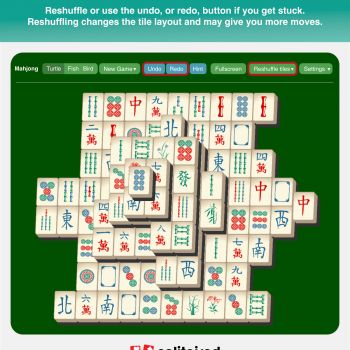
The online Mahjong experience delivers a clean visual design that highlights each tile without unnecessary clutter. The interface adapts to different screen sizes, allowing players to enjoy a smooth session on a desktop monitor or a tablet. Subtle sound effects accompany tile movements, creating an immersive atmosphere while remaining optional for those who prefer silence.
Who can enjoy the game and why it appeals to many
Mahjong welcomes both newcomers and seasoned enthusiasts. The rules are presented in a clear tutorial that guides beginners through the matching mechanics, while advanced players can focus on optimizing their score through strategic tile removal. The balance between luck and skill makes each session feel fresh, encouraging repeated play.
Insights for Better Play
Understanding the basic layout and tile types
The game board consists of several stacked layers of tiles arranged in a pyramid shape. Only tiles that are free on one side and have no tile on top can be selected. Matching pairs must be identical in design, and removing them reveals new possibilities. Recognizing patterns early helps prevent dead‑ends later in the round.
Key tactics for higher scores and longer streaks
Strategic planning is essential for achieving high scores. Players should aim to clear tiles from the lower layers first, as this opens up additional moves. Keeping an eye on the remaining tiles of each design allows you to anticipate future matches. When multiple options are available, choose the pair that reveals the most hidden tiles.
- Dynamic board that reshapes after each successful match
- Optional hints that highlight removable pairs without giving away solutions
- Score multiplier for clearing an entire layer without mistakes
- Progressive difficulty that introduces larger layouts as you improve
- Responsive controls that work with mouse clicks or touch taps
How to play
Starting a new game and selecting difficulty
- Open the game interface and click the start button
- Choose a difficulty level; higher levels present larger tile arrangements
- Confirm your selection to generate a fresh board
Making a move and matching tiles
- Identify a tile that is free on one side and has no tile above it
- Click or tap the tile to select it; it will be highlighted
- Find another free tile with the same design and select it
- The matching pair disappears and the board updates automatically
- Continue matching until no removable pairs remain or the board is cleared
Frequently Asked Questions
Is there a time limit for each round
No strict timer forces you to rush; however, a gentle countdown appears if you remain idle for an extended period. This feature encourages steady progress without creating pressure.
Can I play on mobile devices
Yes the game is fully responsive and works on smartphones and tablets. Touch controls replace mouse clicks, providing the same level of precision.
How are points calculated after a successful match
Each matched pair awards a base number of points. Additional bonuses apply when you clear an entire layer, achieve a streak of consecutive matches, or finish the board without using hints.
Is there a way to undo a move if I make a mistake
The game includes a single undo option per round. Activating it restores the most recent pair of tiles, allowing you to correct an accidental selection.
Do I need to create an account to track my progress
Creating an account is optional. Guest players can enjoy the full experience, while registered users gain access to leaderboards and the ability to save high scores across sessions.